
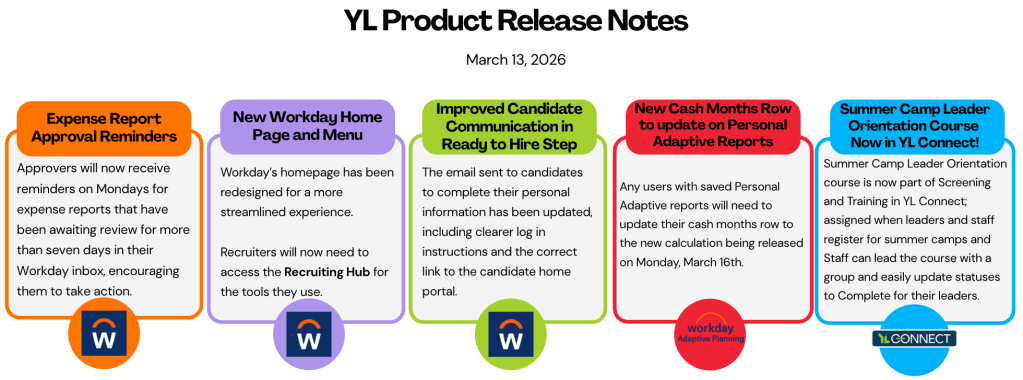
Be sure to check out the full release notes for a complete list of updates for each Product:
These updates have been made with your feedback in mind. The goal is to help things run more smoothly, save you time, and better support your everyday work. If you have questions or ideas, don’t hesitate to reach out.
HR Support: hrsupport@sc.younglife.org
Financial Services: financialservices@sc.younglife.org
Connections Team: helpdesk@sc.younglife.org
Workday & Adaptive Release – 1.23.26

HIGHLIGHTS:
What’s New or Improved
Demotions access clarification
To better align with role expectations and our HR policies, demotions will now only be processed by a Manager or HR Director in Workday. PAR Partners will no longer see the Demotion option in the Job Change menu, aligning the system with HR policy and role expectations.
- Who’s impacted: Managers, HR Directors, PAR Partners
New required step required for Candidates
A new step has been added to the Ready to Hire process: candidates must submit their date of birth from their Candidate Home page before PAR Partners can complete the Hire business process.
- This ensures required employee data is collected earlier, supporting a smoother hire and onboarding process.
Recruiting FAQ
Why don’t I see the “Ready to Hire” step for a candidate?
- Internal candidates:
Recruiters must manually check the YL Screening boxes in Workday for the Ready to Hire step to appear. - External candidates:
YL Screening must be completed by the candidate. Once finished, the required checkboxes will automatically populate, allowing the candidate to move forward.
Adaptive
What’s New or Improved
Create and modify Adaptive reports
Users can now create and modify reports in Adaptive, allowing them to tailor reports to local or team-specific needs.
- Supports customized reporting (e.g., committees reviewing specific expense types)
- Provides flexibility without impacting organization-wide shared reports
- Ideal for cost centers that analyze data differently
Adaptive Reports: Creating and Modifying Reports
Workday Finance
What’s New or Improved
New recipients of notifications for overdue P Card transactions.
PAR Partners will now receive Workday notifications when cardholders they support have overdue P-Card transactions, in addition to the cardholder and the manager.
Here’s the breakdown:
- 45 days – cardholder and manager receive notice.
- 55 days – cardholder, manager, PAR Partner receive notice.
- 60 days – cardholder, manager, PAR Partner receive notice.
Don’t Miss!
There is a whole list of new or updated Knowledge Articles listed at the bottom of the release notes. Worth at least scanning to see what’s new and what has been updated.
New and Updated Knowledge Articles
Finance:
- Adaptive Reports: Creating and Modifying Reports
- Loading Bank Statements in Workday for Accountants
- Spend Authorizations: Final Tasks for Finance
 South Central Division Young Life